
Help clarify basic questions about products, opening hours, availability, pickup, or where a customer should go next.
Offline Cantonese & Mandarin for iPhone
Handle everyday bilingual conversations with less friction.
CantoRelay helps a Cantonese speaker and a Mandarin speaker take turns, check what the phone heard, correct it when necessary, and play the translated reply. Recognition, translation, and speech stay on the iPhone.
Two-way conversation
Review before replay
Works on device
Models included
No account
No subscription
iPhone only · iOS 26 or later · No account required
A practical aid for short, everyday exchanges
Useful when a small business needs to keep the conversation moving.
CantoRelay is designed for one turn at a time—not for silent, automatic interpreting. That review step is useful when names, times, quantities, and next actions matter.
Work through a service request, preferred time, or simple preparation instructions while keeping the text visible for review.
Explain that an item is ready, confirm the next step, or give a short status update before another staff member takes over.
Handle arrival, access, location, and basic onsite questions when a phone is more practical than a shared workstation.
Bridge everyday Cantonese and Mandarin exchanges among customers, owners, relatives, and part-time staff.
Support simple directions, welcome information, event details, or routine guest questions without sending the conversation to a translation account.
One person, one turn, one review
Speak. Check. Correct. Play.
Tap Cantonese or Mandarin based on the language the person is about to speak.
Speak naturally, then finish the recording so the app can prepare the transcript and translation.
Check what the phone recognized. Edit the source text and translate again when a detail needs fixing.
Let the other person hear the translated reply, then switch directions for their next turn.
Designed for clarity at the point of service
The two directions stay obvious.
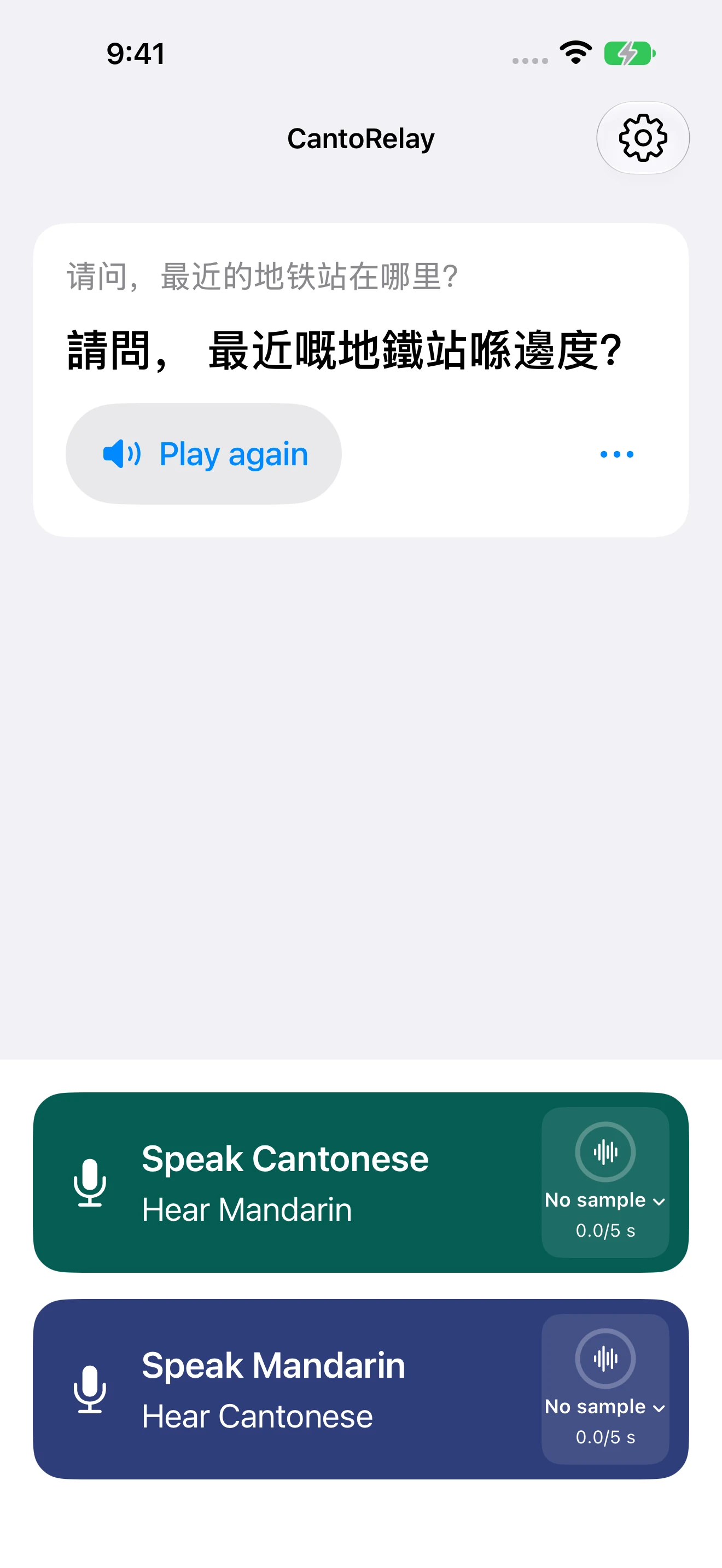
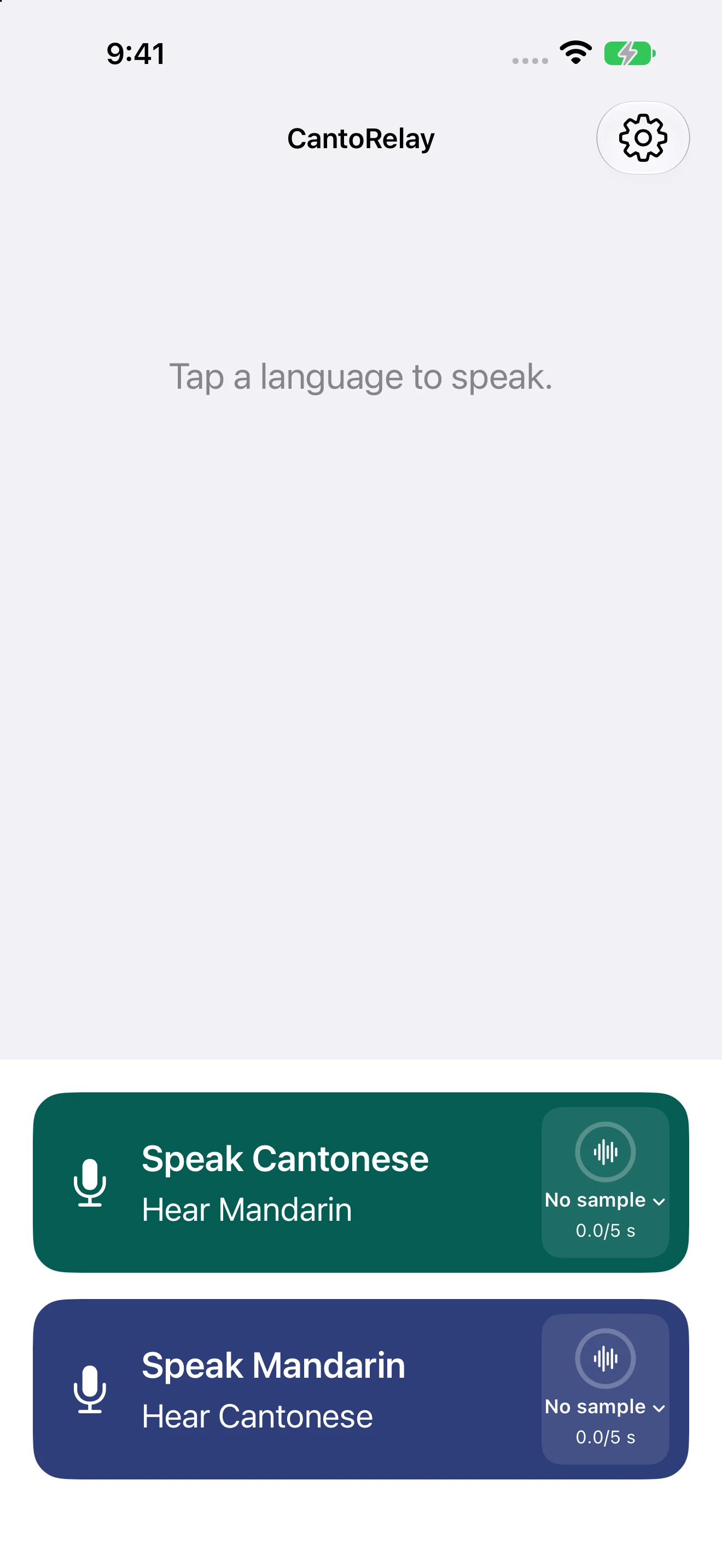
The start screen separates “Speak Cantonese, Hear Mandarin” from “Speak Mandarin, Hear Cantonese.” After each turn, the recognized sentence and translated response remain visible instead of disappearing into an audio-only exchange.
That makes it easier to point at the screen, catch a recognition mistake, repeat the translated speech, or hand the phone to the other person.
Cantonese ↔ Mandarin
Simplified or Traditional Chinese
Replay when needed
What this project demonstrates
A reusable pattern for private small-business apps.
CantoRelay is one focused product, but its interaction patterns also apply to custom customer-service, staff-assistance, and field-workflow apps.
Use a phone’s local speech and language capabilities when a workflow benefits from privacy, predictable access, or no server dependency.
Let a person inspect and correct the system’s output before it becomes the next action, message, or record.
Replace a complicated dashboard with two obvious starting actions that match the real decision in front of the user.
Keep sensitive working data on the device by default and make external sharing an explicit user choice.
Support the scripts and labels customers actually read instead of treating language as a late-stage text replacement.
Place explicit permission, identification, deletion, and fallback controls around optional generated speaker voices.
Private by default
The conversation stays on the iPhone.
CantoRelay needs no account and uses no developer-operated cloud inference service. Required recognition and translation models are included with the app. Conversation text and optional, consented speaker samples stay local until you delete them.
Local app data may be included in Apple device backups according to the iPhone owner’s Apple settings. Anything deliberately shared through an iOS system feature is controlled by the person using the phone and the destination they choose.
No account
No advertising
No analytics
No cloud inference
Need the same thinking in your own workflow?
Build a focused app around the conversation your business handles every day.
604Apps can adapt patterns such as guided intake, bilingual review, local speech, staff handoffs, and private on-device processing to a specific business process—not just a general-purpose translator.
Common questions
CantoRelay FAQ
Does CantoRelay need an internet connection?
The required recognition and translation models are bundled with the app. Recognition, translation, and the voice workflow run on the iPhone without a developer-operated cloud inference service.
Which translation directions does it support?
CantoRelay supports Cantonese to Mandarin and Mandarin to Cantonese. You can display Chinese text in Simplified or Traditional characters.
Can I correct what the app heard?
Yes. Review the recognized text, edit it when needed, translate again, and then play the revised response.
Does it create an account or track customers?
No. CantoRelay has no account, advertising, or analytics. Conversation text remains local unless the phone owner deliberately shares it through an iOS system feature.
Can a business record a staff member’s voice?
An optional on-device speaker voice may be created only with the speaker’s explicit agreement. Use your own voice or one you have permission to use. CantoRelay identifies cloned speech as AI-generated, and the sample can be deleted or replaced with an Apple system voice.
Is it a replacement for a professional interpreter?
No. It is an aid for everyday, low-stakes conversation. Translation can be wrong, so use a qualified interpreter for medical, legal, emergency, safety-critical, contractual, or important financial communication.
A conversation aid that works on the phone in your hand
Make the next everyday exchange easier to handle.
Choose a language, speak one turn, check the text, and play the translated response—without creating an account.