
Vancouver iOS app development
Native iOS app development for Vancouver businesses.
604Apps helps Vancouver teams turn a useful workflow into a focused iPhone, iPad, or Mac app. The work is practical: define the problem, choose the smallest useful release, build with native Apple platform patterns, test the real flow, and prepare the app for customers, staff, or the App Store.
When native iOS is the right choice
Native iOS is usually the strongest fit when the app depends on polish, camera capture, audio, offline storage, subscriptions, widgets, Apple Intelligence features, or a workflow that should feel at home on iPhone and iPad. Vancouver restaurants, service businesses, shops, schools, and local teams often do not need a massive platform. They need one workflow that is reliable enough to replace a spreadsheet, a manual intake form, or a repeated customer service task.
The best starting point is a narrow release. A cafe might begin with a pickup order and loyalty flow instead of a full delivery platform. A service company might begin with photo capture, job notes, and offline checklists. A training business might begin with guided audio content and progress tracking. The first version should prove that the app saves time, reduces errors, or creates a better customer experience before adding the next layer.
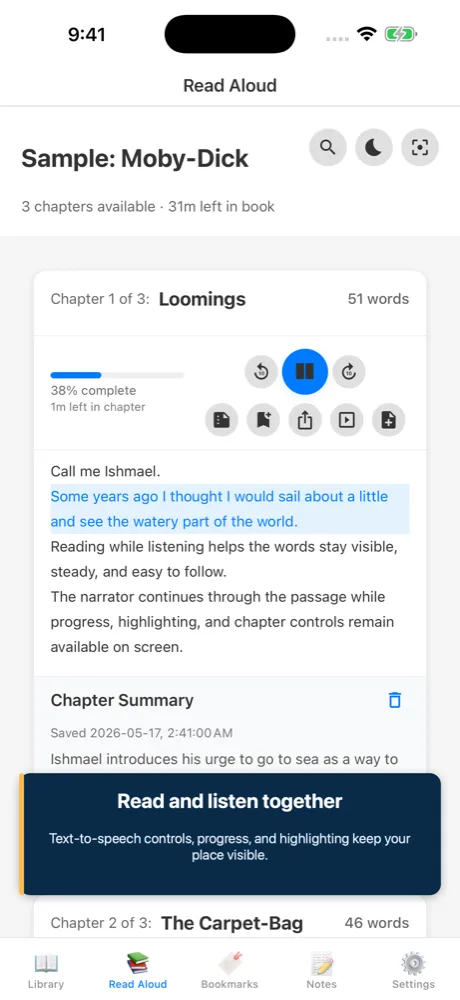
604Apps uses existing portfolio work as a practical reference. Read Aloud shows long-form reading, playback, notes, summaries, and accessibility-friendly controls. SpeechTrack: Live Voice Clone shows timeline editing, voice generation, export, and project management. Receiptopia shows camera capture, OCR, data extraction, and record keeping. These are the same building blocks that show up in many business apps.
Examples of useful Vancouver business apps
A restaurant in Mount Pleasant could use a lightweight app for pickup orders, tasting menus, regular-customer offers, and staff checklists. A clinic or wellness studio could use a private client portal for appointment prep, document capture, and follow-up instructions. A contractor in East Vancouver could use an offline field app for site photos, measurements, quotes, and job completion notes. A neighbourhood retailer could use an app for product lookup, loyalty, event reminders, and customer requests.
Those examples sound different, but the technical shape is similar: a clean mobile interface, structured data, a small admin workflow, authentication when needed, storage, push notifications only when useful, and a clear handoff path for the business. The value is not the number of screens. The value is whether the app solves the repeated task that currently costs time or loses customers.
For public App Store products, the work also includes launch assets, privacy nutrition labels, subscription decisions if revenue is recurring, App Review preparation, and post-launch updates. For internal apps, the priorities shift toward access control, reliability, offline behaviour, and a deployment process that staff can actually use.
How 604Apps scopes a first release
A good first release starts with the user and the job. Who opens the app? What are they trying to complete? What information do they already have? What happens after they tap submit, save, scan, record, or pay? These questions keep the project from becoming a feature list with no centre.
For Vancouver businesses, the first planning session should produce a short feature map: the core workflow, the screens required to complete it, any systems the app connects to, the launch target, and the evidence needed to know the app worked. That evidence may be fewer phone calls, faster quote intake, more repeat orders, fewer missed documents, or a smoother App Store onboarding funnel.
The result is a native app that can grow. Swift, SwiftUI, StoreKit, Vision, AVFoundation, CloudKit, local databases, and on-device AI features can be added where they earn their place. The important part is keeping the first version useful enough to ship.
What to prepare before contacting 604Apps
A useful first note does not need to be polished. For this topic, start with the business goal, the target users, the current workaround, and the result the app should create. For example, say whether the app is for customers, staff, or both; whether it needs iPhone, iPad, Mac, or all three; and whether the first release is meant for the public App Store or a private team workflow.
Include any screenshots, spreadsheets, forms, menus, receipts, scripts, training material, or existing tools that explain the workflow. 604Apps can use those materials to identify the screens, data model, risky features, launch path, and the smallest release that would be worth testing with real users. Notes about timeline, budget comfort, required integrations, and current pain points are also useful. The estimate is stronger when the conversation starts with real operating details instead of a broad feature wishlist.